

On this page
The 10-Minute Pitch Deck Problem
01
Notes
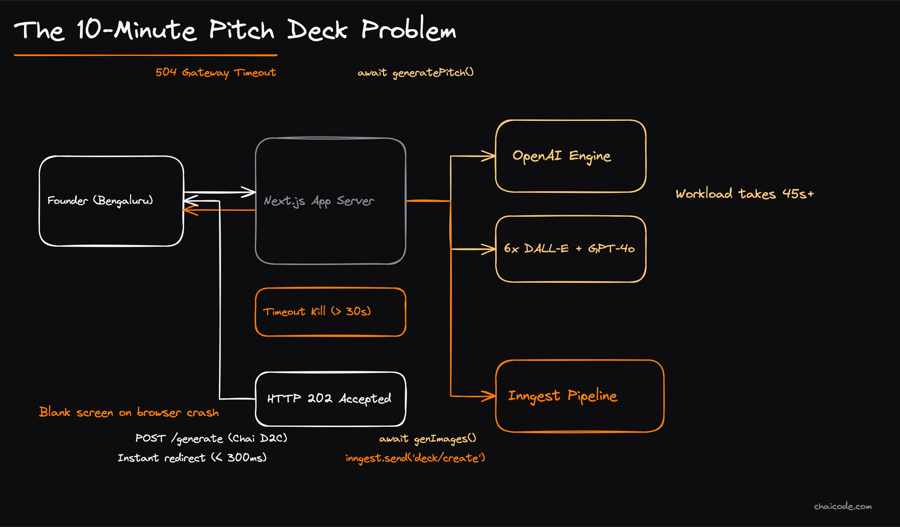
Imagine entering your D2C chai startup idea on a website, but waiting 45 seconds for a single page reload causes your browser to time out and crash.
Generating text, structured slides, and 6 custom marketing images takes over 30 seconds of heavy AI work.
If your Next.js server blocks on this single request like an IRCTC Tatkal queue at 10:00 AM, the server crashes and the user sees a blank screen.
To fix this, modern web apps break long workflows into immediate responses and resilient background pipelines.
Instant ACK, Poll in Background
02
![A two-layer vertical flow. Top layer shows 'Next.js UI' with two browser windows: 'CreateDeckForm' sending a quick arrow to 'POST /api/decks' (labeled '40ms return id'), and 'DeckViewer' sending a looping circular arrow labeled 'Poll every 3s' to 'GET /api/decks/[id]'. Below it, a status tracker line displays 4 pills in sequence: 'PENDING', 'GENERATING', 'COMPLETE', and a separate red pill for 'FAILED'.](/cdn-cgi/image/width=900,format=auto,fit=scale-down/assets/935a1aeefb301bc153c5a3036668ec2eadf1a309a327c12cf2821a78749b393f.png)
Notes
When a founder submits an idea like 'Zepto for pet care in Koramangala', Layer 1 and 2 don't wait for AI to finish.
The POST /api/decks endpoint inserts a blank deck record with status 'PENDING' into the database and returns a deck ID in under 40 milliseconds.
The Next.js frontend immediately redirects to /decks/[id] and polls the GET /api/decks/[id] endpoint every 3 seconds.
A clean status pill flips between four distinct states: PENDING, GENERATING, COMPLETE, or FAILED.
Layer 3: Reliable Background Queues
03
Notes
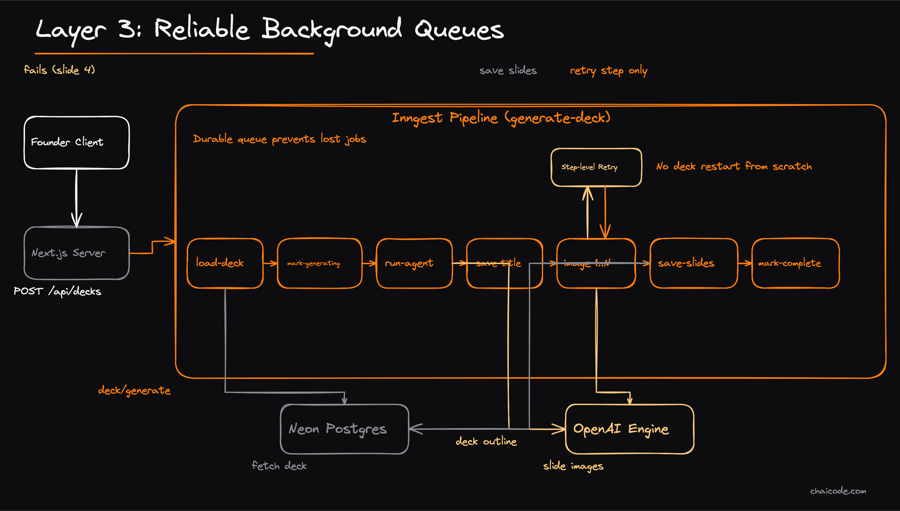
Traditional servers drop jobs if they crash mid-way, but an event queue like Inngest handles heavy lifting safely.
When POST /api/decks completes, it dispatches an event 'deck/generate' containing the deckId to an Inngest background worker.
The job pipeline executes 7 discrete atomic steps: load-deck, mark-generating, run-agent, save-title, image-generation, save-slides, and mark-complete.
If slide 4 image generation fails mid-way, Inngest retries only that specific step instead of regenerating the entire deck from scratch.
Layer 4A: Structured Slides Generation
04
Notes
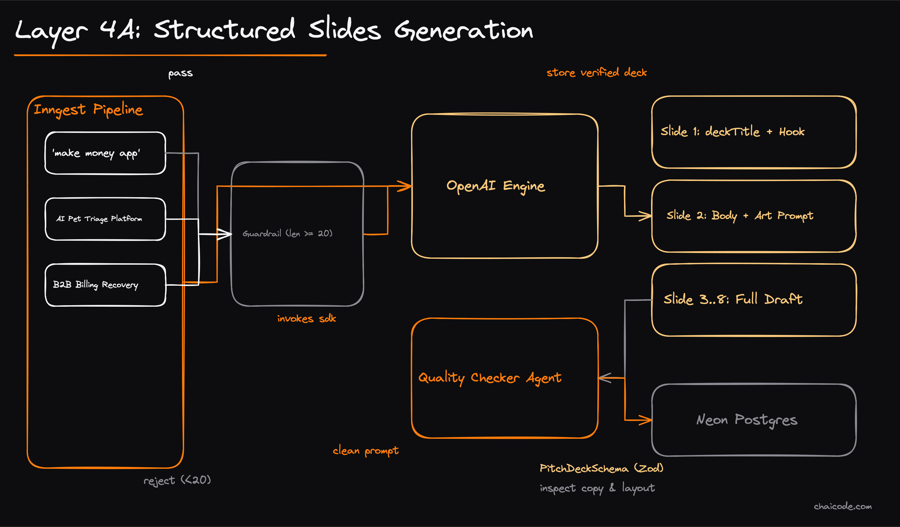
The background job invokes the OpenAI Agents SDK to transform a raw text prompt into structured presentation slides.
First, an input guardrail rejects any startup idea under 20 characters, blocking low-effort submissions like 'make money app'.
Next, a Zod schema enforces exact output JSON: a deckTitle plus an array of 5 to 8 slides, each containing a slide title, body copy, and a detailed imagePrompt.
A dedicated quality checker agent reviews the draft before saving, preventing hallucinated nonsense or broken layouts.
Layer 4B: Parallel AI Asset Delivery
05
Notes
Text is only half the battle; investors want visual pitch decks with branding and product mockups.
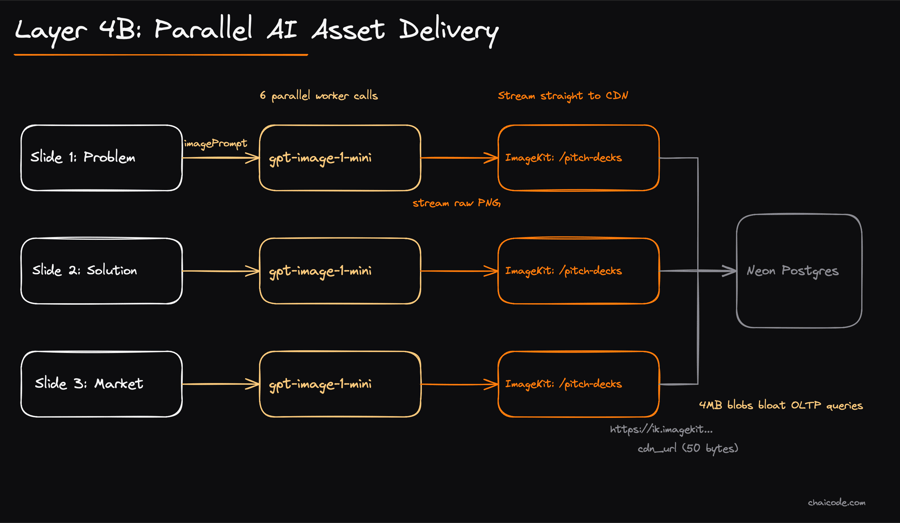
Branch B takes the imagePrompt from each of the 6 slides and calls OpenAI's gpt-image-1-mini in parallel.
OpenAI generates the raw PNG image, but storing heavy image blobs in a transactional database slows queries to a crawl.
Instead, the app streams the PNG straight to ImageKit CDN into a '/pitch-decks' folder and saves only the lightweight CDN URL.
Layer 5: Relational Persistence and Delivery
06
Notes
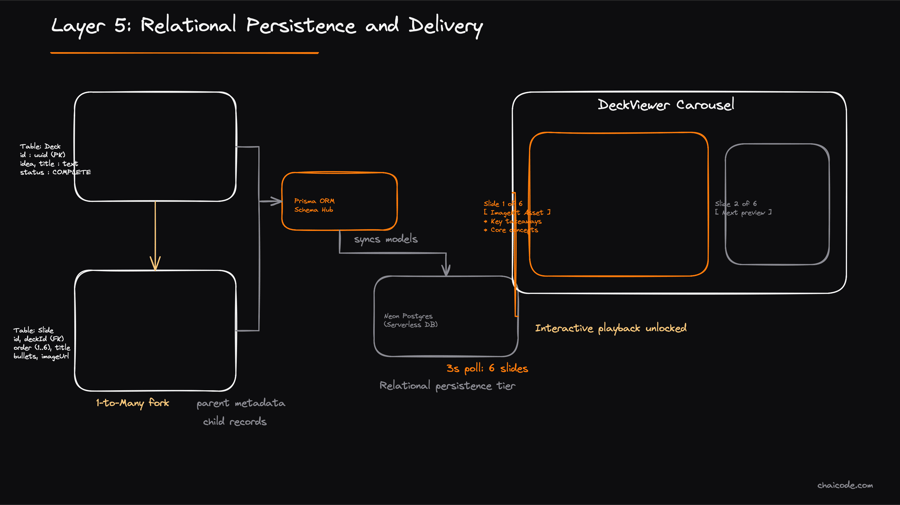
All generated content converges in Neon Postgres via the Prisma ORM client across two related models.
The Deck table stores metadata: deckId, raw idea, title, and status ('GENERATING' to 'COMPLETE').
The Slide table holds a 1-to-many relationship: order number, slide title, content bullet points, and the final ImageKit CDN URL.
Once marked 'COMPLETE', the next 3-second poll from the user's browser fetches all 6 populated slides and reveals an interactive carousel.